Unlock your project’s potential with our custom development workflow guide. Streamline processes, minimize stress, and enhance outcomes for your business.
Build better projects with a custom development workflow

TL;DR:
- Small businesses need tailored workflows to reduce miscommunication, scope creep, and delays.
- Building a custom process involves mapping current stages, identifying bottlenecks, and assigning clear ownership.
- Regular reviews and feedback collection help maintain an efficient, evolving development workflow.
Managing a web development project without a clear, tailored process is a bit like trying to build a house without architectural drawings. You might get something standing at the end, but the journey will be costly, stressful, and full of surprises nobody wanted. Small businesses and startups face this challenge constantly. Tight budgets, small teams, and unique requirements make generic approaches a poor fit. This guide walks you through exactly why a custom development workflow matters, what it should contain, how to build one step by step, and how to keep it improving over time.
Table of Contents
- Understanding the need for a custom development workflow
- Key components and tools for your workflow
- Step-by-step: Designing your bespoke development process
- Avoiding pitfalls and measuring workflow success
- Our perspective: What most miss about custom workflows
- Moving forward with expert support
- Frequently asked questions
Key Takeaways
| Point | Details |
|---|---|
| Custom beats generic | A tailored workflow reduces errors and delivers results that generic processes rarely match. |
| Tool choice matters | Pick tools that fit your team’s needs, are easy to integrate, and support future growth. |
| Iterate and adapt | Continual review and small improvements keep your development process effective over time. |
| Measure success | Use clear KPIs to monitor workflow performance and prove value to stakeholders. |
Understanding the need for a custom development workflow
When small businesses first commission a website or digital product, they often assume the process will be straightforward. Hand over a brief, wait a few weeks, and receive something polished. In reality, projects regularly overrun, deliverables miss the mark, and communication breaks down in ways nobody anticipated. The root cause is almost always the same: no clearly defined, bespoke process tailored to the team and the goal.
Generic workflows are designed for generic situations. They assume a certain team size, a predictable scope, and a client who understands technical terminology. None of those assumptions hold for most small businesses and early-stage startups. When you force a rigid process onto a project it was never designed for, you get friction at every stage. Developers interpret briefs differently from clients. Designers iterate in isolation. Feedback arrives too late to be useful.
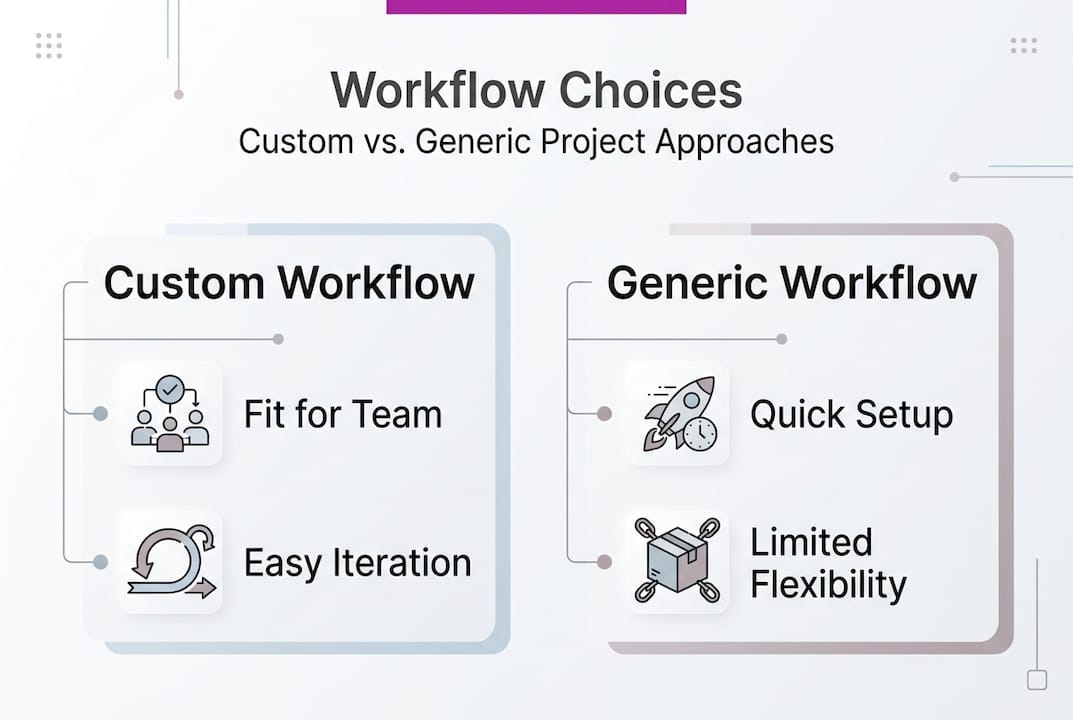
The business case for building a tailored approach is well established. Research consistently shows the benefits of custom web design extend far beyond aesthetics, encompassing improved user experience, faster load times, and stronger alignment between the product and the business’s actual goals. A workflow built around your specific project amplifies all of those advantages.
Here is what a poorly defined process typically costs a small business:
- Miscommunication between stakeholders and developers, leading to rework
- Scope creep, where undefined boundaries allow the project to expand without additional budget
- Delayed delivery, often caused by unclear handoffs between design, development, and testing
- Increased costs, as fixes made late in a project are significantly more expensive than those caught early
- Team frustration, which affects morale and can undermine future projects
By contrast, investing time in a custom website development process or a custom SaaS solutions workflow that reflects your actual working style produces measurable gains. Projects deliver on time more reliably. Errors are caught earlier. Clients understand what to expect and when.
“A bespoke process is not a luxury for large teams. It is the minimum viable structure any serious project needs to succeed. The cost of not having one is always higher than the cost of building one.”
The foundation of a custom workflow is clarity. Every member of the team, including non-technical stakeholders, should be able to look at the process and immediately understand where a project stands, what comes next, and who is responsible for it.
Key components and tools for your workflow
With the importance established, let us break down the essential components and tools you need to build your custom workflow. Every effective development process moves through broadly similar stages, but the way those stages are structured, timed, and resourced should reflect your business specifically.
The six core stages of any development workflow are:
- Planning: Define scope, objectives, budget, and timeline before a single line of code is written
- Design: Translate requirements into wireframes, prototypes, and visual specifications
- Development: Build the product iteratively, with regular check-ins against the original brief
- Testing: Identify and resolve bugs, usability issues, and performance problems
- Deployment: Release the product to a live environment with rollback plans in place
- Maintenance: Monitor performance, apply updates, and respond to user feedback post-launch
Each stage needs the right tools. Choosing tools randomly or simply using whatever is familiar creates integration problems down the line. The following table gives you a practical overview of the categories to consider and the purpose each serves.

| Tool category | Purpose | Examples |
|---|---|---|
| Project management | Track tasks, timelines, and ownership | Linear, Trello, Notion |
| Version control | Manage code changes and collaboration | Git, GitHub, Bitbucket |
| Design and prototyping | Create visual specs and user flows | Figma, Adobe XD |
| Communication | Keep stakeholders aligned | Slack, Loom, email |
| Testing and QA | Catch issues before they reach users | Jest, Cypress, BrowserStack |
| Deployment and CI/CD | Automate releases and reduce human error | GitHub Actions, Vercel, Netlify |
| Documentation | Record decisions and technical specs | Confluence, Notion, GitHub Wiki |
When selecting tools, apply these criteria before committing:
- Does the tool integrate with what you already use?
- Can non-technical team members understand and use it without significant training?
- Does it scale if your team or project grows?
- What is the cost at your current usage level, and at your projected growth level?
- Is there adequate support and documentation if something goes wrong?
You can explore the free business tools available on this site as a starting point, or discuss your specific stack requirements through technical consulting services if you need a more structured recommendation.
Pro Tip: Resist the temptation to adopt every tool that promises to solve a problem. A workflow built on five well-integrated tools will always outperform one built on fifteen loosely connected ones. Consolidate wherever possible, and only add complexity when a genuine need arises.
Step-by-step: Designing your bespoke development process
Armed with your toolkit, you are ready to design your process with clear, sequential steps. This is where many small teams stall. They know they need a better process, but the task of designing one feels abstract or overwhelming. The key is to start with what you have, document it honestly, and improve from there.
Follow these steps to map and build your workflow:
-
Conduct a needs analysis: Before designing anything, list your most common project types, your usual team composition, and the pain points you experience most frequently. This analysis becomes the foundation of your entire workflow.
-
Map your current process: Write down exactly what happens on a typical project today, even if it is chaotic. You cannot improve what you have not documented.
-
Identify gaps and bottlenecks: Where do projects slow down? Where does communication break down? Where are errors most likely to occur? These points tell you where your new workflow needs the most structure.
-
Define your stages and handoffs: Based on the six core stages above, decide how each transitions to the next. Who signs off on the design before development begins? Who approves a deployment before it goes live? Document these handoff points explicitly.
-
Assign ownership: Every stage and every task should have a named owner. Ambiguity about responsibility is one of the most common reasons projects stall.
-
Run a pilot project: Apply your new workflow to a single, low-risk project before rolling it out across everything. Observe where it helps and where it creates friction.
-
Gather feedback and iterate: After the pilot, collect honest input from everyone involved, including the client if appropriate. Refine the process before the next project.
-
Document and share: Store your workflow somewhere accessible. Every team member should be able to find and reference the process without having to ask someone else.
The following table compares common approaches teams take when building their first workflow, and the typical outcomes each produces.
| Approach | Typical outcome | Recommended? |
|---|---|---|
| Copy a generic template | Poor fit, quickly abandoned | No |
| Build from scratch with no research | Misses key pain points | No |
| Audit current process then adapt | Relevant, practical, adopted | Yes |
| Hire a consultant to design it | Fast, expert-led, scalable | Yes, when budget allows |
Your web design workflow and your SaaS development process may look quite different from each other, and that is expected. The principle is the same: build around real conditions, not theoretical ideals.
Pro Tip: After each project, set aside 30 minutes for a structured retrospective. Ask three questions: what worked well, what did not, and what one thing would you change for the next project? Even brief, consistent retrospectives compound into significant process improvements over 12 months.
Avoiding pitfalls and measuring workflow success
Once your process is live, it is essential to avoid common traps and ensure ongoing improvement. Even a well-designed workflow will degrade if it is not actively maintained. The following mistakes appear repeatedly in small business development projects and are worth watching for from day one.
- Neglecting documentation: Teams that do not record decisions end up repeating the same conversations on every project. Documentation is not bureaucracy. It is memory.
- Ignoring team feedback: Developers and designers working within the process day to day will spot friction that project managers and clients cannot see. Create a simple, low-effort channel for this feedback.
- Skipping testing under deadline pressure: Testing is the stage most frequently sacrificed when a project runs late. This is almost always a false economy, as defects discovered post-launch cost significantly more to fix than those caught during QA.
- Overlooking security: Small businesses are increasingly targeted precisely because they are perceived as less protected. Embedding secure development practices into your workflow from the start costs far less than remediating a breach after the fact.
- Treating the workflow as fixed: A process that cannot evolve becomes an obstacle. Build in review points from the beginning.
To measure whether your workflow is actually working, you need objective data. Set up the following KPIs at the start of each project:
- Delivery time: Are projects completing closer to the original estimate over time?
- Defect rate: How many bugs are reported post-launch per project, and is this number trending downward?
- Rework volume: What percentage of completed work needs to be revised due to misaligned requirements?
- Client satisfaction score: A simple post-project survey question can reveal whether the process feels smooth from the client’s perspective.
- Team satisfaction: Burnt-out, frustrated teams produce worse outcomes. Survey your team after projects, not just your clients.
“The most expensive bug is the one you did not find until a client did. Build your testing and review process as though every gap will be exploited, because eventually it will be.”
Pro Tip: Schedule a formal workflow review on a fixed cadence, quarterly at minimum. Add it to the calendar now, before the next project begins. Reviews that are planned in advance actually happen. Reviews that are meant to happen “when there is time” rarely do.
Our perspective: What most miss about custom workflows
Here is something worth saying plainly: there is no such thing as a perfect workflow. Many small businesses and startups spend weeks trying to design the ultimate process before they have used any process at all. That is time and energy that could have been spent on an actual project.
The real value of a custom workflow is not perfection. It is direction. A clear, simple process gives everyone on the team a shared understanding of what to do next, and that alone eliminates a surprising amount of confusion and delay. Our view, built from over two decades of working across projects of all sizes, is that simplicity consistently beats sophistication for small teams. A workflow that a three-person team can follow without a manual will always outperform one that requires specialist knowledge to navigate.
The teams that improve fastest are not the ones with the most elaborate processes. They are the ones that iterate regularly, act on feedback honestly, and resist the urge to add complexity unless it solves a real, recurring problem. If you would like to explore how technical consulting insights can help you build a leaner, more effective process, that conversation is always worth having.
Start small. Review often. Build forward.
Moving forward with expert support
If you are ready to take your development process from reactive to reliable, support is available. Whether you need a complete workflow designed from scratch, a review of your existing approach, or hands-on help delivering a project under a structured process, the right expertise makes a measurable difference to outcomes.
Explore the full range of all custom development services available, from fixed-price website builds through to bespoke full stack solutions and ongoing technical support. Each service is built around your specific requirements, not a one-size-fits-all template. If you are ready to move forward, book a consultation and let us work out exactly what your project needs to succeed. No jargon, no unnecessary complexity, just a clear plan and the experience to deliver it.
Frequently asked questions
What is a custom development workflow?
A custom development workflow is a tailored process for managing software or website projects, built specifically around your business’s needs and team structure rather than a generic template.
Why should startups avoid generic development workflows?
Generic workflows lack the flexibility to address unique startup challenges, which reduces project efficiency and success. Custom web design and processes consistently produce better alignment between a product and its intended business outcomes.
How can I measure if my workflow is effective?
Track KPIs such as project delivery time, number of post-launch defects, rework volume, and team satisfaction scores to gauge workflow performance and identify where improvements are needed.
How often should I review my development process?
Review and refine your workflow after each major project or on a quarterly basis, whichever comes first, to ensure the process stays relevant and continues to improve over time.