
Discover what server-side rendering is and its benefits for performance and SEO. Learn how it can enhance user experience today!
What is server-side rendering? A developer’s guide

Server-side rendering (SSR) is defined as the process where a web server generates a fully rendered HTML page and sends it directly to the browser, rather than relying on JavaScript to build the page client-side. This approach improves Time to First Paint and First Contentful Paint (FCP) by delivering readable content immediately. SSR is the industry-standard term for what is SSR in web development, and it sits at the heart of decisions around performance, SEO, and user experience. Understanding how it works, where it excels, and where it costs you is the foundation of any serious rendering strategy.
How does server-side rendering work?
SSR follows a clear, six-step request lifecycle. Understanding each step helps you predict where bottlenecks appear and where you gain the most.
- HTTP request. The browser sends a request to the server for a specific URL.
- Data fetching. The server retrieves any required data synchronously, querying databases or APIs before rendering begins. Frameworks like Next.js implement this with functions such as
getServerSideProps, which fetch data per request before the page renders. - Pre-rendering. The server compiles the data and application logic into a complete HTML document.
- HTTP response. The server sends the finished HTML to the browser.
- Browser page load. The browser displays the HTML immediately. The user sees content before any JavaScript has executed.
- Client-side hydration. JavaScript loads and attaches event listeners to the existing HTML, making the page interactive.
What is hydration and why does it matter?
Hydration is the step that converts static server-rendered HTML into a fully interactive application. Without it, the page looks correct but does nothing when you click a button. The browser downloads the JavaScript bundle, the framework reconciles the existing DOM with its virtual representation, and event listeners bind to elements.
State synchronisation during hydration adds complexity. The server must serialise application state, such as a Redux store, into an inline script so the client can resume from the same point. Without this, the client re-renders from scratch, causing layout shifts and wasted work.
Pro Tip: Always serialise your server state into a <script> tag on the page. If the client and server states diverge, you will see hydration mismatches that are notoriously difficult to debug.
What are the main benefits of server-side rendering?
SSR delivers concrete advantages that directly affect business outcomes, not just developer metrics.
- Faster perceived load time. The browser receives complete HTML immediately, so users see content before JavaScript executes. This improves FCP and initial render speed measurably compared to client-side rendering.
- SEO advantages. Search engine crawlers and social media bots receive fully structured HTML including meta tags, Open Graph data, and schema markup. Many crawlers cannot execute JavaScript, so SSR guarantees consistent indexing.
- Better accessibility. Pages rendered server-side are partially usable without JavaScript. Users on slow connections or with JavaScript disabled still receive meaningful content.
- Security. API keys, database credentials, and business logic stay on the server. The client never receives sensitive configuration, which reduces the attack surface compared to purely client-side approaches.
- Social sharing. When someone shares a URL on LinkedIn or Twitter, the platform’s crawler reads the server-rendered meta tags directly. Client-side apps frequently produce blank previews because the crawler exits before JavaScript runs.
“SSR is a strategic choice for SEO and user retention rather than a fix-all approach.” The decision to use SSR should be driven by your content type, your audience’s connection speed, and your SEO requirements, not by framework defaults.
SSR is ideal for content-heavy applications such as news sites, e-commerce catalogues, and marketing pages, where fast initial load and search visibility are business-critical. A product page that loads visibly in under a second converts better than one that spins while JavaScript boots up.
What are the challenges and trade-offs of SSR?
SSR is not free. Every benefit comes with a cost you need to account for before committing.
- Server resource consumption. Every request triggers a full render cycle on the server. Under high traffic, this increases CPU and memory usage significantly compared to serving static files or delegating rendering to the client.
- Hydration latency. After the HTML arrives, there is a window where the page appears loaded but is unresponsive. Buttons do nothing. Forms do not submit. Users who click during this window get no feedback, which damages trust.
- State synchronisation complexity. Keeping server and client state aligned requires careful architecture. Asynchronous data fetching must be mapped into synchronous rendering steps, which is the most common source of SSR bugs.
- Interaction to Next Paint (INP) impact. Because JavaScript loads after the initial HTML, complex pages can score poorly on INP, a Core Web Vitals metric that measures responsiveness. A visually complete page that is slow to respond still fails users.
- Implementation complexity. SSR requires a running Node.js server or equivalent. Static hosting is not sufficient. Deployment, caching strategies, and error handling all become more involved.
Pro Tip: Use hybrid rendering approaches where SSR handles the initial page load and client-side rendering takes over for subsequent navigation. This gives you the SEO and performance benefits of SSR without hammering your server on every interaction.
The hybrid SSR and CSR model represents the current best practice. Frameworks like Next.js and SvelteKit support this natively, letting you choose rendering strategy per route rather than committing the entire application to one approach.

How does SSR compare with client-side rendering and static generation?
These three approaches answer the same question differently: where and when is the HTML produced?
| Approach | HTML generated | Best suited for | SEO | Server cost |
|---|---|---|---|---|
| Server-side rendering | On the server, per request | News, e-commerce, personalised pages | Excellent | High |
| Client-side rendering | In the browser, after JS loads | Dashboards, SaaS apps, authenticated tools | Poor without workarounds | Low |
| Static site generation | At build time, once | Blogs, documentation, marketing sites | Excellent | Minimal |
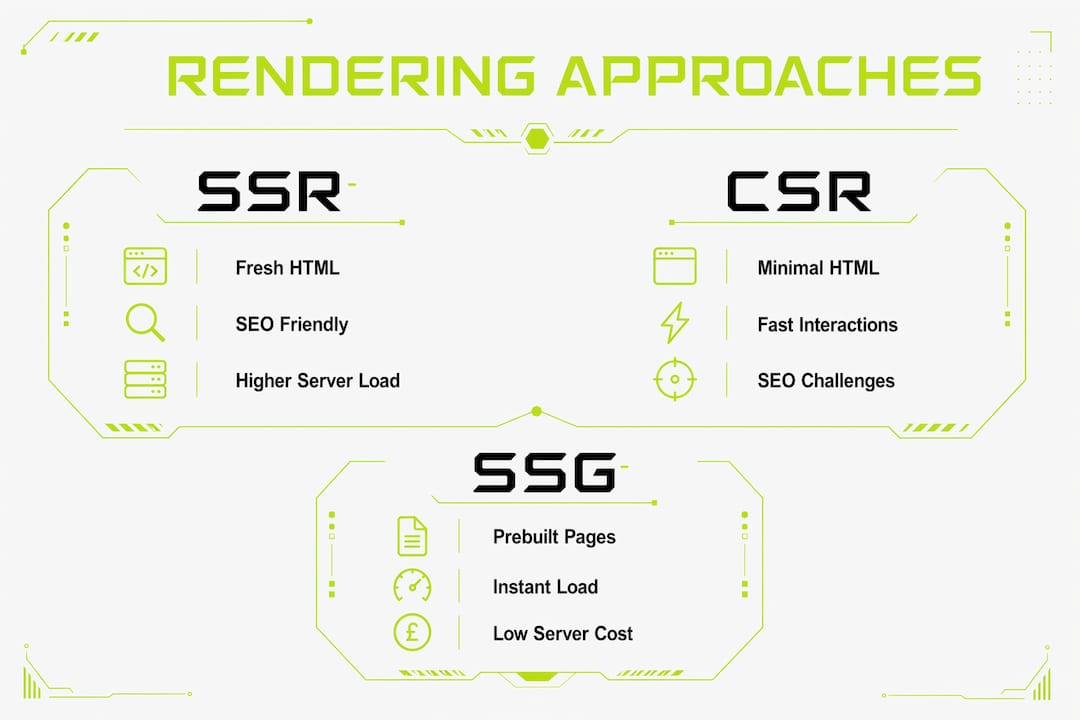
Client-side rendering (CSR) sends a minimal HTML shell and a JavaScript bundle. The browser builds the full page after the bundle executes. This suits applications where content is personalised, frequently updated, or sits behind authentication, because SEO is less relevant and interactivity is the priority.
Static site generation (SSG) pre-builds every page at deploy time. Pages load instantly from a CDN with no server computation per request. The trade-off is that content is only as fresh as the last build. A blog post updated five minutes ago may not appear until the next deployment.
SSR sits between these two. It generates fresh HTML per request, so content is always current, and it delivers complete markup to crawlers. The cost is server computation on every page view. For a full-stack development approach, the right choice often combines all three strategies across different routes in the same application.
Choosing between these approaches is not a one-time decision. A well-architected application uses SSR for public-facing, SEO-critical pages, CSR for authenticated dashboards, and SSG for content that rarely changes. Understanding front-end frameworks that support all three modes gives you the flexibility to apply the right tool per route.
Key takeaways
Server-side rendering delivers the strongest SEO and initial load performance when applied to the right pages, but requires careful hydration management and server resource planning to avoid creating a worse experience than it solves.
| Point | Details |
|---|---|
| SSR defined | The server generates complete HTML per request before sending it to the browser. |
| Hydration is critical | JavaScript must bind event listeners after load; mismatched state causes layout shifts and bugs. |
| SEO benefit is real | Crawlers receive fully structured HTML including meta tags, improving indexing reliability. |
| Server cost is real | Every request triggers a render cycle; high traffic requires caching and resource planning. |
| Hybrid is best practice | Combining SSR for initial load with CSR for subsequent interactions balances speed and interactivity. |
My honest view on SSR after 20 years of building
Most developers reach for SSR because they have heard it is good for SEO. That is true, but it is an incomplete reason to commit your entire application to it. I have seen projects where SSR was applied globally, the server costs tripled, and the hydration bugs consumed more developer time than the SEO gains were worth.
The projects where SSR genuinely paid off shared one characteristic: they had public-facing pages with real search traffic and content that changed frequently. An e-commerce product catalogue, a news feed, a property listing site. These are the use cases where the investment makes sense. A SaaS dashboard behind a login screen does not need SSR. Nobody is Googling your authenticated app pages.
The hydration window is the part that catches developers off guard. Your page looks done. The user thinks it is done. But the JavaScript has not finished binding yet. I always recommend testing on throttled connections, not just your local machine, because that is where the dead-page problem becomes visible. A three-second hydration delay on a fast laptop is a ten-second frustration on a mid-range mobile.
My practical advice: use SSR for your landing pages, product pages, and any route that a search engine or social crawler will visit. Use static generation for your blog and documentation. Use client-side rendering for everything behind authentication. This is not a compromise. It is the architecture that modern full-stack development has converged on for good reason.
— Richard
SSR expertise built into every build at Richharrington
Getting SSR right requires more than reading the framework documentation. It requires understanding caching layers, hydration state management, and how rendering choices affect your Core Web Vitals scores in production.

Richharrington builds custom websites and SaaS platforms where rendering strategy is chosen deliberately, not by default. Whether your project needs SSR for SEO-critical pages, static generation for speed, or a hybrid architecture across routes, every decision is made with your performance and business goals in mind. You deal directly with a senior engineer who has been building production applications for over 20 years. No templates, no offshore handoffs, no lock-in.
FAQ
What is server-side rendering in simple terms?
Server-side rendering is when the web server builds the full HTML page and sends it to the browser, rather than the browser building it with JavaScript. The user sees content immediately, before any scripts run.
What is the difference between SSR and client-side rendering?
SSR generates HTML on the server per request; client-side rendering sends a minimal HTML shell and builds the page in the browser after JavaScript loads. SSR is faster for initial load and better for SEO; CSR is better suited to interactive, authenticated applications.
Does SSR always improve SEO?
SSR delivers fully structured HTML to search engine crawlers, which improves indexing reliability compared to client-side rendering. It is particularly valuable for public-facing pages where search visibility drives traffic.
What is hydration in SSR?
Hydration is the process where JavaScript loads after the server-rendered HTML and attaches event listeners, making the page interactive. Until hydration completes, the page appears loaded but is unresponsive to user input.
When should you not use SSR?
SSR is not suited to authenticated dashboards, real-time tools, or applications where content is entirely personalised per user. In these cases, client-side rendering or a hybrid approach delivers better performance with lower server cost.